European Customer Services:+34 930 46 50 92

We use cookies - Consent

We use third party services that help us to improve and optimize our online experience. For the use of certain services we need your prior consent which can be revoked at any time. You can find further information on data protection in our privacy policy

Details

Allow convenience functions

Allow shop optimisations

In order to optimise our website, we use services that collect and aggregate data and make it available to us as a statistical overview.

View imprint

You are here: » Homepage
A-Z:
Price:
Total 52 Products
Items per page
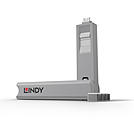
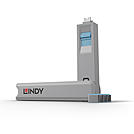
USB C Port Blocker 4pcs + Key, Blue

  • Physically prevent access to a USB Type C / Thunderbolt Port
  • Quick and simple to use
  • Single key & 4 Type C Blockers
  • Pack of 10 blockers (without key) are also available
  • 2 Year Warranty
USB Type C Port Blockers are useful little devices that system administrators can use to physically prevent access to USB ports. USB Port Blockers allow locks to be inserted and removed from USB ports to stop unauthorised users from inserting pen drives, USB mass storage and mobile devices into shared workstations or devices with USB ports in public spaces.

To use, simply attach a lock to the key and insert it into the USB port. Release the sliding mechanism on the key to leave the lock in place. To remove, simply insert the key back into the lock and pull away.

Please note: this key is only compatible with the corresponding colour of port blocker.
No.: 40465
Multipurpose Security Cable

The LINDY multipurpose anti-theft cable is suitable for all portable computers and accessories that have the appropriate security slot ( Kensington ) device .


  • 4 - digit combination lock
  • steel  cable with plastic sheathing
  • Suitable for computers, notebooks and accessories
  • Length: about 1.8m


No.: 20980
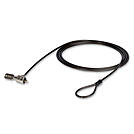
Notebook Security Cable

  • Convenient key operated barrel lock design
  • Supplied with 2 keys
  • Attaches to the security slot found on most portable computers
  • Plastic covered heavy duty steel cable
  • 2 year warranty

This Notebook Security Cable provides security for your portable notebook or laptop computer. The cable simply attaches to the security slot found on most portable computers. Can also be used to secure a range of other computer accessories which have a suitable security slot fitted.
No.: 21150
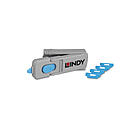
HDMI Port Blocker Key - Pack of 4 Blockers, Blue

  • Physically prevent access to a HDMI Port
  • Quick and simple to use
  • Up to 4 blockers can easily be stored inside the key
  • Pack of 10 blockers (without key) are also available
  • 2 Year Warranty
The Lindy HDMI Port Blockers are useful little devices that can be used to physically prevent access to HDMI ports. With the HDMI Port Blocker Key, the user can quickly block any open device ports and easily prevent users from connecting cables, devices or inserting foreign objects without permission.

The semi-permanent HDMI Port Blocker is made up of a moulded plastic blocking cap that plugs securely into the HDMI port with a special insertion key. The blocker latches into the port just as a normal HDMI cable would and remains in place until removed using the insertion key.

Designed to help protect against unauthorised access to IT or AV equipment, as well as preventing unintentional or malicious damage to ports. It can also act as a visual cue, showing inactive or disconnected ports, ideal for use in schools, office or other public sector environments.

The key not only acts as the insertion and removal tool for the HDMI Port Blockers but also serves as a compact storage solution, ideal for IT administrators or facility managers managing multiple devices. This all-in-one design adds an extra layer of convenience to an already practical and efficient physical security tool. Up to four HDMI port blocks can be conveniently stored inside the specially designed key, making it easy for users to carry multiple blockers and use them as needed. 

To use, simply attach a blocker to the key and insert it into the HDMI port. Release the sliding mechanism on the key to leave the blocker in place. To remove, simply insert the key back into the blocker and pull away.*

Security Note: The Port Blockers will only act as a basic physical & visual deterrent to tampering. It will not prevent a determined attacker, intent on gaining physical access to a HDMI port.
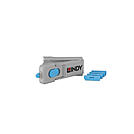
*Slide the button fully back while keeping your finger pressed on it, then pull the key straight out.
When the button is slid fully back, the wings at the top of the key open to their widest and provide maximum leverage to remove the lock.
No.: 40320
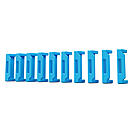
HDMI Port Blockers (Without Key) - Pack of 10, Blue

  • Physically prevent access to a HDMI Port
  • Quick and simple to use
  • Pack of 10 individual HDMI Blockers
  • Pack of 4 blockers and key are also available
  • 2 Year Warranty

The Lindy HDMI Port Blockers are useful little devices that can be used to physically prevent access to HDMI ports. With the HDMI Port Blocker Key, the user can quickly block any open device ports and easily prevent users from connecting cables, devices or inserting foreign objects without permission. 


The semi-permanent HDMI Port Blocker is made up of a moulded plastic blocking cap that plugs securely into the HDMI port with a special insertion key. The blocker latches into the port just as a normal HDMI cable would and remains in place until removed using the insertion key.


Designed to help protect against unauthorised access to IT or AV equipment, as well as preventing unintentional or malicious damage to ports. It can also act as a visual cue, showing inactive or disconnected ports, ideal for use in schools, office or other public sector environments. 


To use, simply attach a blocker to the key and insert it into the HDMI port. Release the sliding mechanism on the key to leave the blocker in place. To remove, simply insert the key back into the blocker and pull away.


Security Note: The Port Blockers will only act as a basic physical & visual deterrent to tampering. It will not prevent a determined attacker, intent on gaining physical access to a HDMI port.

No.: 40321
DisplayPort Port Blocker Key - Pack of 4 Blockers, Blue

  • Physically prevent access to a DP Port
  • Quick and simple to use
  • Up to 4 blockers can easily be stored inside the key
  • Pack of 10 blockers (without key) are also available
  • 2 Year Warranty

The Lindy DP Port Blockers are useful little devices that can be used to physically prevent access to DP ports. With the DP Port Blocker Key, the user can quickly block any open device ports and easily prevent users from connecting cables, devices or inserting foreign objects without permission. 


The semi-permanent DP Port Blocker is made up of a moulded plastic blocking cap that plugs securely into the DP port with a special insertion key. The blocker latches into the port just as a normal DP cable would and remains in place until removed using the insertion key.


Designed to help protect against unauthorised access to IT or AV equipment, as well as preventing unintentional or malicious damage to ports. It can also act as a visual cue, showing inactive or disconnected ports, ideal for use in schools, office or other public sector environments. 


The key not only acts as the insertion and removal tool for the DP Port Blockers but also serves as a compact storage solution, ideal for IT administrators or facility managers managing multiple devices. This all-in-one design adds an extra layer of convenience to an already practical and efficient physical security tool. Up to four DP port blocks can be conveniently stored inside the specially designed key, making it easy for users to carry multiple blockers and use them as needed. 


To use, simply attach a blocker to the key and insert it into the DP port. Release the sliding mechanism on the key to leave the blocker in place. To remove, simply insert the key back into the blocker and pull away.*


Security Note: The Port Blockers will only act as a basic physical & visual deterrent to tampering. It will not prevent a determined attacker, intent on gaining physical access to a DP port.


*Push the sliding button on the key all the way back while holding it down, then pull the key straight out.

When the button is pushed all the way back, the wings at the top of the key open fully, providing maximum leverage for removing the lock.
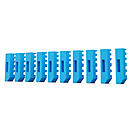
No.: 40324
DP Port Blockers (Without Key) - Pack of 10, Blue

  • Physically prevent access to a DP Port
  • Quick and simple to use
  • Pack of 10 individual DP Blockers
  • Pack of 4 blockers and key are also available
  • 2 Year Warranty

The Lindy DP Port Blockers are useful little devices that can be used to physically prevent access to DP ports. With the DP Port Blocker Key, the user can quickly block any open device ports and easily prevent users from connecting cables, devices or inserting foreign objects without permission. 


The semi-permanent DP Port Blocker is made up of a moulded plastic blocking cap that plugs securely into the DP port with a special insertion key. The blocker latches into the port just as a normal DP cable would and remains in place until removed using the insertion key.


Designed to help protect against unauthorised access to IT or AV equipment, as well as preventing unintentional or malicious damage to ports. It can also act as a visual cue, showing inactive or disconnected ports, ideal for use in schools, office or other public sector environments. 


To use, simply attach a blocker to the key and insert it into the DP port. Release the sliding mechanism on the key to leave the blocker in place. To remove, simply insert the key back into the blocker and pull away.


Security Note: The Port Blockers will only act as a basic physical & visual deterrent to tampering. It will not prevent a determined attacker, intent on gaining physical access to a DP port.
No.: 40325
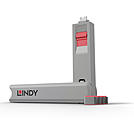
USB C Port Blocker, 4pcs + Key, Pink

  • Physically prevent access to a USB Type C / Thunderbolt Port
  • Quick and simple to use
  • Single key & 4 Type C Blockers
  • Pack of 10 blockers (without key) are also available
  • 2 Year Warranty

USB Type C Port Blockers are useful little devices that system administrators can use to physically prevent access to USB ports. USB Port Blockers allow locks to be inserted and removed from USB ports to stop unauthorised users from inserting pen drives, USB mass storage and mobile devices into shared workstations or devices with USB ports in public spaces.

To use, simply attach a lock to the key and insert it into the USB port. Release the sliding mechanism on the key to leave the lock in place. To remove, simply insert the key back into the lock and pull away.

Please note: this key is only compatible with the corresponding colour of port blocker.
No.: 40425
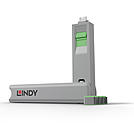
USB C Port Blocker 4pcs + Key, Green

  • Physically prevent access to a USB Type C / Thunderbolt Port
  • Quick and simple to use
  • Single key & 4 Type C Blockers
  • Pack of 10 blockers (without key) are also available
  • 2 Year Warranty
USB Type C Port Blockers are useful little devices that system administrators can use to physically prevent access to USB ports. USB Port Blockers allow locks to be inserted and removed from USB ports to stop unauthorised users from inserting pen drives, USB mass storage and mobile devices into shared workstations or devices with USB ports in public spaces.

To use, simply attach a lock to the key and insert it into the USB port. Release the sliding mechanism on the key to leave the lock in place. To remove, simply insert the key back into the lock and pull away.

Please note: this key is only compatible with the corresponding colour of port blocker.
No.: 40426
USB C Port Blocker, 4pcs + Key, White

  • Physically prevent access to a USB Type C / Thunderbolt Port
  • Quick and simple to use
  • Single key & 4 Type C Blockers
  • Pack of 10 blockers (without key) are also available
  • 2 Year Warranty
USB Type C Port Blockers are useful little devices that system administrators can use to physically prevent access to USB ports. USB Port Blockers allow locks to be inserted and removed from USB ports to stop unauthorised users from inserting pen drives, USB mass storage and mobile devices into shared workstations or devices with USB ports in public spaces.

To use, simply attach a lock to the key and insert it into the USB port. Release the sliding mechanism on the key to leave the lock in place. To remove, simply insert the key back into the lock and pull away.

Please note: this key is only compatible with the corresponding colour of port blocker.
No.: 40427
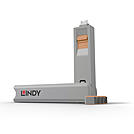
USB C Port Blocker, 4pcs + Key, Orange

  • Physically prevent access to a USB Type C / Thunderbolt Port
  • Quick and simple to use
  • Single key & 4 Type C Blockers
  • Pack of 10 blockers (without key) are also available
  • 2 Year Warranty
USB Type C Port Blockers are useful little devices that system administrators can use to physically prevent access to USB ports. USB Port Blockers allow locks to be inserted and removed from USB ports to stop unauthorised users from inserting pen drives, USB mass storage and mobile devices into shared workstations or devices with USB ports in public spaces.

To use, simply attach a lock to the key and insert it into the USB port. Release the sliding mechanism on the key to leave the lock in place. To remove, simply insert the key back into the lock and pull away.

Please note: this key is only compatible with the corresponding colour of port blocker.
No.: 40428
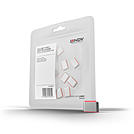
USB C Port Blockers, 10pcs, Pink

  • Physically blocks access to a USB Type C / Thunderbolt port
  • Quick and simple to use
  • Replacement Pack of 10 Blockers
  • Key Available separately
  • 2 Year Warranty

With the Lindy USB Type C / Thunderbolt Port Blocker, you can quickly block open ports and easily prevent users from connecting cables, devices or inserting foreign objects without permission.

The USB Port Blocker is made up of a combined 'key' and 'lock' assembly which plugs into the USB port. To use, simply plug the 'keylock' into the port and release the latch - the lock remains in place! Plug the key back into the lock to remove. Easy!

With this neat little device, system administrators can physically prevent users from connecting Pen Drives, Mobile Phones and other USB Mass Storage Devices to their computers to copy data and introduce viruses.

Please note: these port blockers are only compatible with the corresponding colour of port blocker key.
No.: 40437
Accessories 1 2 3 4 5 Accessories

Security and Cable Management Accessories for IT Workstations

The Lindy accessories range includes security products such as USB port locks and anti-theft cables, as well as cable management solutions. The products are used in offices, server rooms, educational and administrative institutions, and at publicly accessible workstations.


Frequently Asked Questions

What are USB port locks used for?
USB port locks block free USB ports on computers to prevent unauthorized data transfer or the connection of unauthorized devices a standard security element in government agencies, banks, and security-critical environments.

How do anti-theft cables work?
Anti-theft cables connect laptops, monitors, or other devices to a fixed object such as a desk via a locking mechanism effective in open office environments, schools, and coworking spaces.

What does professional cable management include?
Cable management products organize and protect cabling at workstations and in racks [UNVERIFIED: specific product range cable ducts, ties, spiral wrap, etc. depends on model].

Lindy Academy Logo
FREE IT &
AV TRAINING