
We use third party services that help us to improve and optimize our online experience. For the use of certain services we need your prior consent which can be revoked at any time. You can find further information on data protection in our privacy policy
Details
In order to optimise our website, we use services that collect and aggregate data and make it available to us as a statistical overview.
You are here: » Homepage

Power socket board for 19 inch systems for monitoring electrical devices via a TCP/IP network. The IPowerMeter measures current, phase angle, power factor (cos phi), frequency, active-, apparent- and reactive power and indicates the consumed energy in two independent meters. All of the readings are indicated on the device itself and can be accessed via TCP/IP network.
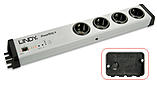
The switch board for TCP/IP networks- high-quality, produced in Germany. Connect up to 4 PCs, routers, access points or other electrical devices up to a power consumption of 3 680 W over the network easily. Switch access is by means of any Web browser - also password-protected where required.
You can also define timed switching operations using the supplied command line tool and e.g. .the Windows scheduler. The built-in measurement connection allows you to connect a temperature sensor to the device. This is available from us upon request. If used, the ambient temperature can then be displayed in the main menu and the switching menu and can be read out via SNMP.
Various end devices can be monitored via the built-in watchdog function. Either ICMP pings or TCP pings are sent to the device being monitored. If a response is not received to these pings within a certain time (the time and the number of attempts can both be configured), the matching power port is reset. Servers or NAS systems which have failed can be restarted automatically.
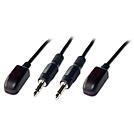
The IR Kit for Fibre Optic AV Extenders enables the extension of IR remote control signals alongside AV signals. The kit comprises of a Receiver and an Emitter which are then directly connected to the extender, and sited in a suitable location at either end of the installation using the adhesive pads on the base of each unit.
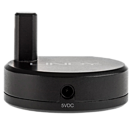
* Please Note: Actual distances will depend entirely on the construction of the building and any walls or floors that are situated between the Transmitter and Receiver units.
The Wireless Extender allows you to control your AV equipment throughout your house even through walls and ceilings using your existing remote control. Its small, lightweight design allows it to be discreetly installed next to your AV equipment.
The Wireless IR Extender can be installed either just using the Transmitter and Receiver units, or in conjunction with the supplied IR Receiver and Emitter cables. To power the Wireless IR Extender simply connect the supplied USB DC cables to the Transmitter and Receiver units and to an available USB port on your TV, AV Receiver, DVD Player etc or to a USB power supply (not included).
Package Contents:
Wireless IR Transmitter
Wireless IR Receiver
IR Receiver Cable
IR Emitter Cable
USB DC Cable x 2
LINDY User Manual
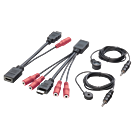
This IR transmitter kit is ideal if your HDMI signal sources and change-over switches are hidden in an AV rack or are spatially separated or if there are problems with HDMI CEC transmission. Or if you want to continue only using the original remote controls of the individual devices.
Attach the IR sensor to your display in an unobtrusive spot. The sensor then feeds the IR signal to the HDMI injector, the HDMI cable/extender sends the signal to the extractor (splitter) where it is split again before being sent to the HDMI signal sources via an IR emitter.
Package Contents:
IR over HDMI Injector
IR over HDMI Splitter
IR Receiver, 2m x 1
IR Emitter, 1.4m x 1
User Manual

 |
 |