


We use third party services that help us to improve and optimize our online experience. For the use of certain services we need your prior consent which can be revoked at any time. You can find further information on data protection in our privacy policy
Details
In order to optimise our website, we use services that collect and aggregate data and make it available to us as a statistical overview.
You are here: » Homepage
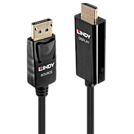
Lindys Active DisplayPort to HDMI® Cable range combines superior performance with stylish design to provide a high quality conversion of DisplayPort 4K@60Hz signals to output to a HDMI® display or projector. This range of active cables come with an in-built chipset to not only provide a reliable connection, but also enhance compatibility with both dual mode and non-dual mode graphic cards and source devices, perfect for use with DP graphics cards, laptops and PCs, while avoiding the need for additional adapters.
With support for resolutions up to 4096x2160@60Hz, these cables are great for creating eye-catching retail displays, innovative working environments or immersive video playback in sports bars and home cinema installations, while support for uncompressed multi-channel audio allows for an impressive three-dimensional surround sound performance to compliment detailed, clear video.
Support for AMD Eyefinity technology also brings the user a cost effective way of creating a non-standard aspect ratio or ultra-high resolution display made up from up to 3 or more monitors. This feature also allows the user to run multiple applications simultaneously on separate screens, improving productivity in the workplace or creating a widescreen gaming experience.
Please note:
Audio output over HDMI® is only supported when the graphics card of the notebook or desktop computer supports audio output over DisplayPort. Several on-board graphics adapters such as Mobile Intel 4 Series Express Chipset in Notebooks (i.e. Dell E6400) do NOT support audio output over DisplayPort, even when HDMI® support (Intel High Definition Audio HDMI® Service) is installed for audio controllers. In such instances a separate audio connection has to be set up.
The terms HDMI, HDMI High-Definition Multimedia Interface, HDMI Trade dress and the HDMI Logos are trademarks or registered trademarks of HDMI Licensing Administrator, Inc.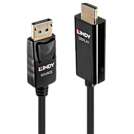
Lindys Active DisplayPort to HDMI® Cable range combines superior performance with stylish design to provide a high quality conversion of DisplayPort 4K@60Hz signals to output to a HDMI® display or projector. This range of active cables come with an in-built chipset to not only provide a reliable connection, but also enhance compatibility with both dual mode and non-dual mode graphic cards and source devices, perfect for use with DP graphics cards, laptops and PCs, while avoiding the need for additional adapters.
With support for resolutions up to 4096x2160@60Hz, these cables are great for creating eye-catching retail displays, innovative working environments or immersive video playback in sports bars and home cinema installations, while support for uncompressed multi-channel audio allows for an impressive three-dimensional surround sound performance to compliment detailed, clear video.
Support for AMD Eyefinity technology also brings the user a cost effective way of creating a non-standard aspect ratio or ultra-high resolution display made up from up to 3 or more monitors. This feature also allows the user to run multiple applications simultaneously on separate screens, improving productivity in the workplace or creating a widescreen gaming experience.
Please note:
Audio output over HDMI® is only supported when the graphics card of the notebook or desktop computer supports audio output over DisplayPort. Several on-board graphics adapters such as Mobile Intel 4 Series Express Chipset in Notebooks (i.e. Dell E6400) do NOT support audio output over DisplayPort, even when HDMI® support (Intel High Definition Audio HDMI® Service) is installed for audio controllers. In such instances a separate audio connection has to be set up.
The terms HDMI, HDMI High-Definition Multimedia Interface, HDMI Trade dress and the HDMI Logos are trademarks or registered trademarks of HDMI Licensing Administrator, Inc.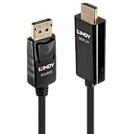
Lindy’s Active DisplayPort to HDMI Cable range combines superior performance with stylish design to provide a high quality conversion of DisplayPort 4K@60Hz signals to output to a HDMI display or projector. This range of active cables come with an in-built chipset to not only provide a reliable connection, but also enhance compatibility with both dual mode and non-dual mode graphic cards and source devices, perfect for use with DP graphics cards, laptops and PC’s, while avoiding the need for additional adapters.
With support for resolutions up to 4096x2160@60Hz, these cables are great for creating eye-catching retail displays, innovative working environments or immersive video playback in sports bars and home cinema installations, while support for uncompressed multi-channel audio allows for an impressive three-dimensional surround sound performance to compliment detailed, clear video.
Support for AMD Eyefinity technology also brings the user a cost effective way of creating a non-standard aspect ratio or ultra-high resolution display made up from up to 3 or more monitors. This feature also allows the user to run multiple applications simultaneously on separate screens, improving productivity in the workplace or creating a widescreen gaming experience.
Please note:
Audio output over HDMI is only supported when the graphics card of the notebook or desktop computer supports audio output over DisplayPort. Several on-board graphics adapters such as Mobile Intel 4 Series Express Chipset in Notebooks (i.e. Dell E6400) do NOT support audio output over DisplayPort, even when HDMI support (Intel High Definition Audio HDMI Service) is installed for audio controllers. In such instances a separate audio connection has to be set up.
Please note: Some of Nvidia's latest drivers do not work correctly at 4k@60Hz 4:4:4 when converting from DP/mDP to HDMI and will only work at 4k@60Hz 4:2:2
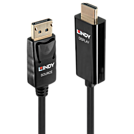
Lindy’s Active DisplayPort to HDMI Cable range combines superior performance with stylish design to provide a high quality conversion of DisplayPort 4K@60Hz signals to output to a HDMI display or projector. This range of active cables come with an in-built chipset to not only provide a reliable connection, but also enhance compatibility with both dual mode and non-dual mode graphic cards and source devices, perfect for use with DP graphics cards, laptops and PC’s, while avoiding the need for additional adapters.
With support for resolutions up to 4096x2160@60Hz, these cables are great for creating eye-catching retail displays, innovative working environments or immersive video playback in sports bars and home cinema installations, while support for uncompressed multi-channel audio allows for an impressive three-dimensional surround sound performance to compliment detailed, clear video.
Support for AMD Eyefinity technology also brings the user a cost effective way of creating a non-standard aspect ratio or ultra-high resolution display made up from up to 3 or more monitors. This feature also allows the user to run multiple applications simultaneously on separate screens, improving productivity in the workplace or creating a widescreen gaming experience.
Please note:
Audio output over HDMI is only supported when the graphics card of the notebook or desktop computer supports audio output over DisplayPort. Several on-board graphics adapters such as Mobile Intel 4 Series Express Chipset in Notebooks (i.e. Dell E6400) do NOT support audio output over DisplayPort, even when HDMI support (Intel High Definition Audio HDMI Service) is installed for audio controllers. In such instances a separate audio connection has to be set up.
Please note: Some of Nvidia's latest drivers do not work correctly at 4k@60Hz 4:4:4 when converting from DP/mDP to HDMI and will only work at 4k@60Hz 4:2:2

This 700mm pole fits securely into a grommet on any office, school or home desk and is part of our Black Modular Desktop Mounting System. With this system you can easily create customised solutions for mounting your laptops and displays in a variety of different configurations.
Installation Examples
The LINDY Black Modular Desktop Mounting System provides a really versatile method for creating your own custom installations. With these products you can raise your notebooks or monitors to create desk space or provide a more comfortable viewing position. Or, by using several arms, you can mount multiple displays on a single larger pole.
To display a LCD screen use this pole in conjunction with an Adjustable LCD Arm. You can display multiple LCDs by using this pole in conjunction with Dual Adjustable LCD Arms, a Dual Curved Arm Bracket or a Triple Curved Arm Bracket. Use a Desktop Notebook Arm to display your notebook.

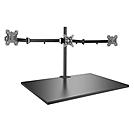
The Lindy Triple Display Bracket with Pole and Desk Clamp is a high quality, all in one solution for mounting three monitors or displays to a standard office desk or table. With a robust design and manoeuvrable arm, the displays can be easily tilted, pivoted or rotated to ensure the optimum viewing angle while also positioned suitably for the viewer, perfect for multi-screen work or home office environments, while also proving an immersive setups for gaming installations.
This mount will fit most major brands and models of monitor that have a VESA size of 100 x 100 or 75 x75mm. (Compliant to VESA standards - VESA measurements are the recesses on the back of your TV or screen. Please measure these to ensure your TV is compatible with this bracket).
Please note: Please confirm this bracket can support the display's VESA mounting dimensions and weight before ordering
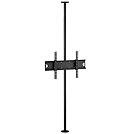
The Lindy Single Display Ceiling to Floor Mount is a professional AV solution for mounting a single display with no requirement for a wall for fixing, instead using a solid floor and ceiling for mounting. This mount is the perfect all-in-one stable solution for creating eye-catching digital signage in retail windows or settings, or other commercial installations. With a narrow, adjustable pole supporting the display, there is minimum distraction from the display ensuring maximum impact and an optimum visual experience for the viewer while offering flexibility to the installer to provide the optimum view of the display.
Conforming to VESA standards of maximum 600x400mm, this mount is perfect for displays from 37" up to 60".
Please note: Please confirm this bracket can support the display's VESA mounting dimensions and weight before ordering
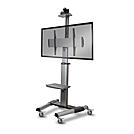
The Lindy Single Display Mount Trolley Stand is a professional, durable solution for mounting a single display which is easily transported between locations using heavy-duty casters that can be locked to keep the stand stationary.
With an adjustable VESA mount that can be fixed at a variety of heights, and tilted both forward and back, this stand provides a flexible and comfortable viewing experience for users in boardrooms or classrooms. Rotatable by 90°, displays can be configured to suit standard landscape or portrait layouts for engaging presentations or use at tradeshows. The 360° rotating wheels provide smooth mobility between locations, ensuring simple portable use with no requirement for repeated disassembly.
Supporting LFDs (Large Format Displays) with VESA sizes from 200x200m to 600x400mm, this trolley provides secure mounting of larger LED, OLED and older plasma displays up to 70_ in size. The high-quality steel structure ensures heavier displays up to 50kg (110.23lb) are supported. A removable and adjustable shelf is included allowing for placement of keyboards or source devices close to the display. The camera shelf at the top of the unit allows for the positioning of webcams for mobile video conferencing. All cables can be neatly concealed within the trolley stand_s discreet cable management system, perfect for ensuring a tidy mounting solution.
Please note: Please confirm this solution can support the display's VESA mounting dimensions and weight before ordering
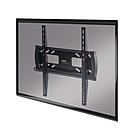
The Lindy Single Display Fixed Wall Mount is a high quality, secure solution for mounting a single display with fixed configuration to a brick or stud wall. The mounts low-profile, slim design provides a flush fit of the display to the surface, ensuring an aesthetically pleasing setup in residential or professional AV installations.
The display is easily adjusted horizontally, or vertically using the VESA mounting holes, to provide the most comfortable viewing experience. Perfect alignment can be assured using the built-in spirit level on the mount itself.
Supporting LFDs (Large Format Displays) with VESA sizes from 200x200m to 400x400mm, this bracket provides secure mounting of larger LED, OLED and older plasma displays up to 55_. The heavy-duty steel structure ensures heavier displays up to 50kg (110.23lb) are supported. The display can be secured with the stands anti-theft design, which allows a padlock (not included) to protect against easy removal of the setup. This provides the ideal secure solution for use in installations within public spaces in the retail or hospitality sectors, such as hotels, holiday rentals or technology showrooms.
Please note: Please confirm this solution can support the display's VESA mounting dimensions and weight before ordering
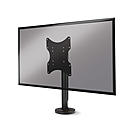
The Lindy Single Display Fixed Desk Mount is a simple, sturdy solution for creating innovative collaboration and presentation spaces or decluttering personal workstations. This mount is ideal for displays between 23 and 43 and safely supports weights up to 50kg (110.23lb) due to its high-quality steel construction, perfect for use with large format displays.
It's small footprint and 60° left to right rotation allows for flexible for installation while increasing available desk space. This feature also allows users to adjust the screen position providing a comfortable viewing angle, ideal multiple users are viewing the same display.
The integrated cable management system allows for a tidy, clutter free installation, meeting the requirements of modern homes and offices by adding aesthetic value to home cinema configurations and productive group spaces. The mount is simply bolted down to a surface and includes a neat cover hiding the mounting hardware.
Please note: Please confirm this bracket can support the display's VESA mounting dimensions and weight before ordering
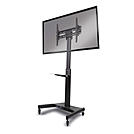
The Lindy Single Display Mount Trolley Stand is a cost-effective solution for mounting a single display which can be easily transported between locations using heavy-duty casters that can be locked when stationary use is required.
With an adjustable VESA mount that can be easily fixed at a variety of heights, and tilted both forward and back, this stand provides a flexible and comfortable viewing experience for users in boardrooms or classrooms. The 360° rotating wheels provide smooth mobility between locations, ensuring simple portable use via secure handles with no requirement for repeated disassembly. These casters can be securely locked in place for stationary use, ideal for creating engaging presentations at tradeshows.
Supporting LFDs (Large Format Displays) with VESA sizes from 200x200m to 600x400mm, this trolley provides secure mounting of larger LED, OLED and older plasma displays up to 70”. The high-quality steel structure ensures heavier displays up to 50kg (110.23lb) can be supported. A removable and adjustable shelf is included allowing for placement of keyboards or source devices close to the display. All cables can be neatly concealed within the trolley stand’s discreet cable management system, perfect for ensuring a tidy mounting solution.
Please note: Please confirm this solution can support the display's VESA mounting dimensions and weight before ordering.
 |
 |
