


We use third party services that help us to improve and optimize our online experience. For the use of certain services we need your prior consent which can be revoked at any time. You can find further information on data protection in our privacy policy
Details
In order to optimise our website, we use services that collect and aggregate data and make it available to us as a statistical overview.
You are here: » Homepage
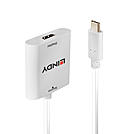
The Lindy USB Type C to HDMI Converter allows users to easily add external video capabilities to a computer featuring the USB Type C port with support for DisplayPort Alternate Mode. The converter is powered by the USB Bus, therefore no external power supply is needed, saving space and time when connecting.
With support for 4K UHD resolutions, content can be viewed with superior clarity and stunning accuracy, while the Type C connectors reversible design means a connection can be found regardless of which way the cable is inserted into the port of a laptop, notebook or Macbook.
With Plug and Play installation, this converter can be installed with minimum fuss, perfect for both professional and first time users.
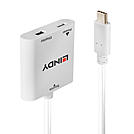
The Lindy USB Type C to Mini DisplayPort Converter allows users to easily add external video capabilities to a computer featuring the USB Type C port with support for DisplayPort Alternate Mode. USB Power Delivery of up to 60W provides power to a notebook or ultrabook via it's USB Type C port whilst simultaneously using it as a video output, simply connect a compatible USB power supply to the Mini DisplayPort Converter.
With support for 4K UHD resolutions, content can be viewed with superior clarity and stunning accuracy, while the Type C connectors reversible design means a connection can be found regardless of which way the cable is inserted into the port of a laptop, notebook or Macbook. With Plug and Play installation, this converter can be installed with minimum fuss, perfect for both professional and first time users.
Please note:
Any interruption of the power supply will cause the USB bus to reset. This is a technical limitation of USB PD 2.0.
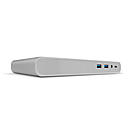
The Lindy USB 3.1 Type C Laptop Docking Station is a compact and multifunctional solution for connecting Laptops to a range of interfaces including dual displays, using a single cable.
Featuring all the interfaces needed for a standard workstation, the Lindy USB 3.1 Type C Docking Station uses a single cable to connect to a Laptop to simultaneously provide dual monitor capabilities, power, Gigabit Ethernet, audio and a USB 3.1 SuperSpeed hub.
Using DisplayPort Alternate Mode via its USB Type C port the Docking Station enables the connection of two monitors to a compatible notebook via HDMI and/or DisplayPort and/or VGA . When using a single monitor resolutions up to Ultra HD 4K 30Hz can be displayed on the HDMI or DisplayPort interface and up to 1920x1200 on the VGA interface. Alternatively when using a dual monitor set up the maximum resolution is 1920x1080 60Hz.
With support for USB Power Delivery, the laptop’s USB Type C power adapter can be used to power the dock and provide up to 60W to power & charge the laptop; 12W are reserved for the Docking Station. The Docking Station features an integrated USB 3.1 SuperSpeed hub that provides four Type A ports and one Type C port. The rear facing Type C port supports both Power Delivery and data transfer; three Type A ports support the USB Battery Charging Specification 1.2 for charging mobile devices, which is able to deliver 5V and up to 1.5A for faster charging compared to a standard USB port.
*Please note: the docking station is provided with a 72W power supply, which perfectly suits most applications. If your device requires the full 100W then a separate 100W PSU must be used.
Please note: Some AMD GPUs and 8th generation Intel NUCs do not support two native 4K displays.
Information about USB 3.0, 3.1 & 3.2
USB 3.0, USB 3.1 and USB 3.2 PCs, cables and devices are all compatible with each other, when using either a USB Type A or USB Type C host interface.
USB 3.0, USB 3.1 Gen 1 and USB 3.2 Gen 1 all support data transfer rates up to 5 Gbps.
USB 3.1 Gen 2 and USB 3.2 Gen 2 both support data transfer rates up to 10 Gbps.
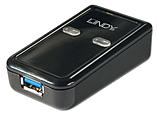
The Lindy USB 3.2 NVMe M.2 SSD Enclosure allows the user to install a PCIe/NVMe based M.2 SSD as a portable external drive to USB devices like laptops or PCs. Support for the USB 3.2 Gen 2 standard allows 10Gbps speeds to guarantee high data transfer rates. UASP support also ensures faster speeds for UASP enabled computers.
This Lindy enclosure is compatible with PCIe/NVMe based M.2 SSDs with M key in 30, 42, 60 and 80mm lengths. USB bus- powered, therefore requiring no external power supply, ensures this enclosure is an ideal portable solution for IT professionals on-the-go. The enclosure has a robust and elegant aluminium design with ventilation holes at each side for better heat dissipation.
Information about USB 3.0, 3.1 & 3.2
USB 3.0, USB 3.1 and USB 3.2 PCs, cables and devices are all compatible with each other, when using either a USB Type A or USB Type C host interface.
USB 3.0, USB 3.1 Gen 1 and USB 3.2 Gen 1 all support data transfer rates up to 5 Gbps.
USB 3.1 Gen 2 and USB 3.2 Gen 2 both support data transfer rates up to 10 Gbps.
 |
 |
