European Customer Services:+34 930 46 50 92

We use cookies - Consent

We use third party services that help us to improve and optimize our online experience. For the use of certain services we need your prior consent which can be revoked at any time. You can find further information on data protection in our privacy policy

Details

Allow convenience functions

Allow shop optimisations

In order to optimise our website, we use services that collect and aggregate data and make it available to us as a statistical overview.

View imprint

Your filter options:

Colour

Vesa Size

Interface Standard

Transmission Medium

Connections

Type

Cable Specification

No. of Outputs

Maximum Supported Weight

You are here: » Homepage
A-Z:
Price:
Total 3222 Products
Items per page
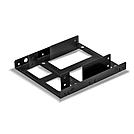
2 x 2.5" HDD & SSD Expansion Bracket

  • Allows the installation of up to two 2.5” HDD’s or SSD’s in a single 3.5” drive bay.
  • Easily expand or upgrade the mass storage of a PC, server or workstation
  • Built to ensure maximum compatibility with 2.5” drives
  • Suitable for drives up to 9.5mm in height
  • 2 year warranty


The Lindy 2 x 2.5" HDD Expansion Bracket is a compact, intuitive solution for the installation two 2.5" hard drives or solid-state drives (SSD) into a single 3.5" drive bay. Ideal for use with small form factor PC's, workstations and servers.


The design ensures compatible PC's can be optimised with single, or dual SSD's, providing exceptional read and write speeds, as well as un-paralleled security and reliability over traditional disk-based drives.


No.: 40554
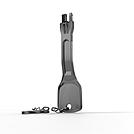
RJ-45 Port Blocker Key, Black

  • Quickly and easily block physical access to RJ-45 Network ports
  • Prevent users from inserting cables, devices or foreign objects without permission
  • Single port blocking key
  • Port blockers available separately
  • 2 year warranty


With the Lindy RJ-45 Port Blocker Key, the user can quickly block open network ports and easily prevent users from connecting cables, devices or inserting foreign objects without permission.


This helps protect against unauthorised access to a network or system, as well as preventing unintentional or malicious damage to ports. It can also act as a visual cue, showing inactive or disconnected ports, ideal for use in schools, office or other public sector environments.


The semi-permanent RJ-45 Port Blocker is made up of a moulded plastic blocking cap that plugs securely into the RJ-45 port with a special insertion key. The blocker latches into the RJ-45 just as a network cable would and remains in place until removed using the insertion key.


To use, simply attach a blocker to the key and plug it into the port. Hold the blocker in place and pull away the Key. To remove simply insert the Key back into the blocker until it ‘clicks’ and pull it away.


Security Note: The Port Blockers will only act as a basic physical & visual deterrent to tampering. It will not prevent a determined attacker, intent on gaining physical access to a RJ-45 port.


Please note: this key is only compatible with the corresponding colour of port blocker (40470 and 40471) 
 

No.: 40630
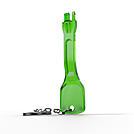
RJ-45 Port Blocker Key, Green

  • Quickly and easily block physical access to RJ-45 Network ports
  • Prevent users from inserting cables, devices or foreign objects without permission
  • Single port blocking key
  • Port blockers available separately
  • 2 year warranty


With the Lindy RJ-45 Port Blocker Key, the user can quickly block open network ports and easily prevent users from connecting cables, devices or inserting foreign objects without permission.


This helps protect against unauthorised access to a network or system, as well as preventing unintentional or malicious damage to ports. It can also act as a visual cue, showing inactive or disconnected ports, ideal for use in schools, office or other public sector environments.


The semi-permanent RJ-45 Port Blocker is made up of a moulded plastic blocking cap that plugs securely into the RJ-45 port with a special insertion key. The blocker latches into the RJ-45 just as a network cable would and remains in place until removed using the insertion key.


To use, simply attach a blocker to the key and plug it into the port. Hold the blocker in place and pull away the Key. To remove simply insert the Key back into the blocker until it ‘clicks’ and pull it away.


Security Note: The Port Blockers will only act as a basic physical & visual deterrent to tampering. It will not prevent a determined attacker, intent on gaining physical access to a RJ-45 port.


Please note: this key is only compatible with the corresponding colour of port blocker.


No.: 40631
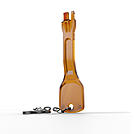
RJ-45 Port Blocker Key, Orange

  • Quickly and easily block physical access to RJ-45 Network ports
  • Prevent users from inserting cables, devices or foreign objects without permission
  • Single port blocking key
  • Port blockers available separately
  • 2 year warranty


With the Lindy RJ-45 Port Blocker Key, the user can quickly block open network ports and easily prevent users from connecting cables, devices or inserting foreign objects without permission.


This helps protect against unauthorised access to a network or system, as well as preventing unintentional or malicious damage to ports. It can also act as a visual cue, showing inactive or disconnected ports, ideal for use in schools, office or other public sector environments.


The semi-permanent RJ-45 Port Blocker is made up of a moulded plastic blocking cap that plugs securely into the RJ-45 port with a special insertion key. The blocker latches into the RJ-45 just as a network cable would and remains in place until removed using the insertion key.


To use, simply attach a blocker to the key and plug it into the port. Hold the blocker in place and pull away the Key. To remove simply insert the Key back into the blocker until it ‘clicks’ and pull it away.


Security Note: The Port Blockers will only act as a basic physical & visual deterrent to tampering. It will not prevent a determined attacker, intent on gaining physical access to a RJ-45 port.


Please note: this key is only compatible with the corresponding colour of port blocker (40480 and 40481).


No.: 40632
RJ-45 Port Blocker Key, Yellow

  • Quickly and easily block physical access to RJ-45 Network ports
  • Prevent users from inserting cables, devices or foreign objects without permission
  • Single port blocking key
  • Port blockers available separately
  • 2 year warranty


With the Lindy RJ-45 Port Blocker Key, the user can quickly block open network ports and easily prevent users from connecting cables, devices or inserting foreign objects without permission.


This helps protect against unauthorised access to a network or system, as well as preventing unintentional or malicious damage to ports. It can also act as a visual cue, showing inactive or disconnected ports, ideal for use in schools, office or other public sector environments.


The semi-permanent RJ-45 Port Blocker is made up of a moulded plastic blocking cap that plugs securely into the RJ-45 port with a special insertion key. The blocker latches into the RJ-45 just as a network cable would and remains in place until removed using the insertion key.


To use, simply attach a blocker to the key and plug it into the port. Hold the blocker in place and pull away the Key. To remove simply insert the Key back into the blocker until it ‘clicks’ and pull it away.


Security Note: The Port Blockers will only act as a basic physical & visual deterrent to tampering. It will not prevent a determined attacker, intent on gaining physical access to a RJ-45 port.


Please note: this key is only compatible with the corresponding colour of port blocker (40482 and 40483) 


No.: 40633
Dual Display Gas-Spring Desktop Mount

  • Mount dual displays to a standard desk
  • Gas-Spring offers complete freedom of movement, creating an optimum viewing experience
  • Integrated cable management helps to create a clean, minimalist workspace
  • Conforms to VESA standards (75 x 75mm & 100 x 100mm)
  • 2 Year Warranty


The Lindy Dual Display Gas-Spring Desktop Mount is a flexible, elegant solution for creating additional workspace in educational, office based or home environment, removing the need clunky, traditional monitor stands. This mount is ideal for two displays up to 27” and 6.5kg in weight each, utilising the global standard VESA, compatibility is virtually guaranteed.


Gas-spring adjustment offers huge quality of life improvements over traditional, clamp-based brackets. The display can be positioned freely as this mount allows for 360° rotation, as well as 180° pivot & up to 145° tilt adjustment. Height adjustment ensures users can position any display in their direct eyeline, helping to create a comfortable, ergonomic workspace and reducing health risks. All of this can be done without the need for any tools post installation.


Integrated cable management produces a clean, minimalist workspace, as ugly cable clutter is a thing of the past. Due to the nature of this bracket, desk space is freed up for alternative hardware, or more workspace, perfect for those in cramped office environments such as call centres, or live chat help desks.  


Please note: This display uses the VESA standard for mounting, confirm that any display is also compatible with VESA mounting dimensions and is below the maximum supported weight.

No.: 40706
Single Monitor Office Cubicle Mount

  • Mounts a single 17-28” monitor on an office cubicle partition
  • Adjustable height settings to achieve the optimal viewing angle
  • 360° rotation of the display for both portrait and landscape working
  • Simple and efficient installation
  • 2 year warranty


The Lindy Single Monitor Cubicle Mount is a simple and sturdy solution for creating additional space in an office workstation, by mounting a single display over a standard cubicle partition. This mount is ideal for displays between 17 and 28” that weigh no more than 8kg, great for both small and large office monitors.

The adjustable height fixing allows for the precise positioning of the users display, while also ensuring an optimum viewing angle from wherever the user is sat or stood, great for a customizable and comfortable employee working experience. 360° rotation allows for both portrait and landscape orientation of the monitor for flexible working, ideal in design, coding and photo editing.


The integrated cable management trunking also provides an additional solution to creating a tidy, more ergonomic workspace with more room for additional hardware or space to create and work more comfortably, perfect for use in cramped office environments such as call centres and live chat help desks.

No.: 40879
Hidden-Category 1 .... 10 11 12 13 14 .... 269 Hidden-Category
Lindy Academy Logo
FREE IT &
AV TRAINING