


We use third party services that help us to improve and optimize our online experience. For the use of certain services we need your prior consent which can be revoked at any time. You can find further information on data protection in our privacy policy
Details
In order to optimise our website, we use services that collect and aggregate data and make it available to us as a statistical overview.
You are here: » Homepage
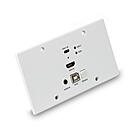
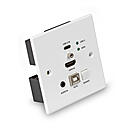
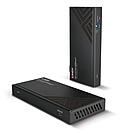
The Lindy Cat.6 DisplayPort 1.2 & USB HDBaseT KVM Extender is an high-end, reliable solution for extending high quality 4K DisplayPort signals over long distances with standard Cat.6 network cable.
This extender also supports lossless audio formats including Dolby TrueHD and DTS-HD to add powerful multi-channel sound to video content, providing an enhanced experience and sense of immersion for the viewer. USB KM connectivity via 2 USB HID ports allow for a keyboard and mouse at the receiver to control a DP equipped PC from a remote PC setup, which can be stored in a secure or controlled temperature environment, while seamlessly providing consistent video content from the source.
Featuring bi-directional IR ports at both sides of the setup, the source equipment can be seamlessly controlled from the display side, and the display can also be controlled from the DisplayPort source device. RS-232 connections also allow for integration into pre-installed control systems. In addition, PoC (Power over Cable) functionality provides additional flexibility. This allows power to be supplied alongside data through Cat.6 network cable in a point-to-point connection between the transmitter and receiver, meaning only a single power supply is required at the transmitter or receiver unit. Ideal for example when power outlets are limited at the receiver end of the installation.
The extenders built-in EDID function ensures maximum compatibility with the display or projector at the receiver, further enhancing this system focus on providing high quality 4K DP content over distances easily and with minimum hassle for the user.
Please Note: keep the units in a cool and dry place. If the extender has to stay in a closed and small area, please ensure that the operating temperature is within the range shown in technical specifications.
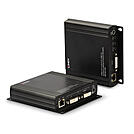
The Lindy Cat.6 DVI-D Single Link, USB, Audio & RS-232 KVM Extender allows users to control a source device such as a PC from a single keyboard, mouse and display up to 140m using a Cat.6 RJ-45 cable. Supports single link resolutions up to 1920x1200 and HDMI signals including Full HD 1080p, 3D and HDCP 1.4. Ideal for KVM applications, the Extender consists of a transmitter and a receiver unit. The transmitter must be connected to a source such as a PC or KVM Switch, while the console with display, keyboard and mouse must be connected to the receiver. It's also possible to connect additional USB 2.0 devices such as storage and hard drives (webcams are not supported).
The extenders built-in EDID function ensures maximum compatibility with the display or projector at the receiver or even at the loop out DVI port on the transmitter, while analogue audio 3.5mm inputs and outputs allow users to connect speakers, microphones and a line-in interface.
RS-232 connections also allow for integration into pre-installed control systems.
This extender provides a simple plug & play installation, with no additional drivers required, great for both professional and first time users. In addition to point-to-point applications, it can be used also via a gigabit network, a rotary switch on both units can pair transmitters with receivers.
Please note: to reach distances longer that 140m, it is possible to add a gigabit network switch or the repeater 42709 inbetween transmitter and receiver (with 42709 the total length supported is up to 280m).
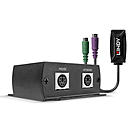
The Lindy 100m Cat.5e/6 PS/2 KM Extender is capable of transmitting standard PS/2 keyboard and mouse signals up to 100m (328.08ft). This device is ideal for local collaboration and presentations in classrooms or meeting rooms.
This Extender is a two part hardware solution comprising a transmitter that connects directly to a computer and a receiver for connection to keyboard and mouse in a convenient location. These units are connected by a single low-cost Cat.5e/6 UTP cable (not included). Powered by the PS/2 bus, the transmitter and receiver units can be easily installed in any environment without the need for external power.
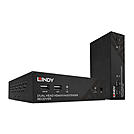
The Lindy 100m Cat.6 Dual Head HDMI®, USB & RS-232 KVM Extender is a powerful, versatile solution for extending and controlling a dual head workstation up to distances of 100m (328.08ft) over a single Cat.6 cable using HDBaseT. It's utilisation of the HDBaseT 2.0 specification allows for the transmission of audio, video & various control methods with just one connection between the transmitter and receiver units.
The use of two HDMI® displays at resolutions up to 1920x1080@60Hz and USB HID's in a convenient remote location creates a super effective productivity console. This gives users the ability to fully operate a high performance PC which is stored in a convenient location, helping to meet the requirements of modern offices as multiple applications can be open and sharing data simultaneously.
Up to 7.1 Digital & Stereo analogue can be passed through from the source to standalone amplifiers, speakers and headphones to ensure any relevant audible information or data is understood by the user.
Serial & Bi-directional IR add to this extender's comprehensive suite of control methods. Source and display devices can be controlled at either point of a configuration using an IR remote control, whilst serial input and control devices can be used at the remote console.
In applications which rely heavily on the uptime of source devices such as medical environments or manufacturing, the Lindy 100m Cat.6 Dual Head KVM extender can be used to ensure PCs or servers can be locked in a secure location to prevent any unauthorised access or tampering of equipment and protect them from major power outages, fires or water leaks. It_s reliable HDBaseT connection means users can be confident that control will always be maintained over the source device even in the most demanding environments.
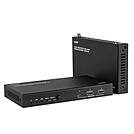
This Lindy USB 3.2 Gen 1 & HDMI® 4K60 HDBaseT Extender can be used to extend the distance between 2 host computers and a console with 2 HDMI® displays and USB peripheral devices by up to 100m. Supports multiple USB signals, control, bulk, interrupt and isochronous data transfer.
A Cat.6A or above network cable* (not included) is used to bridge the connection between the transmitter and the receiver unit at the maximum supported distance of 100m (328.08ft).
The Extender features Power over Cable, which requires a single power supply only to be connected either to the transmitter unit or to the receiver unit. The Transmitter has 2 Type C switchable host ports, one of them supports Power Delivery up to 100W connecting an additional USB power supply from a dedicated Type C power port. Both units have local device ports, 1 Type A and 2 Type A each unit, while the Receiver features 2 HDMI® ports supporting Ultra HD resolutions up to 4K60.
Status LEDs help the user to check power, active host, link between Transmitter and Receiver and if data transfer is running while additional RS232 and FSYNC GPIO pass-though ports allow sending bi-directional commands also for industrial cameras. Switching between the 2 hosts can be done via front panel button on the Transmitter or can be set as automatic, it's also possible to control the extender via API commands.
With robust metal housing and mounting brackets, this Extender is the ideal solution for professional applications and industrial environments.
The power supply is connected via a screw type DC jack, providing a more secure and reliable connection, perfect for professional installations where accidental disconnections could create a major issue.
*: To get the best performances we recommend using HDBaseT-certified Cat.6A (or above) cables.
Please Note: switching between the 2 hosts can take a few seconds, please download the latest DisplayLink drivers.
This extender is certified by HDBaseT Alliance.
HDBaseT is a globally recognised standard for high quality distribution of AV content and other technologies, including power and control, over longer distances via low cost Cat.6 or above cable.
HDBaseT Trade Mark and the HDBaseT Alliance logo are trademarks of the HDBaseT Alliance. Using a different cable type, introducing wall plates, couplers or patch panels will result in a reduction of possible distances.
The terms HDMI, HDMI High-Definition Multimedia Interface, HDMI Trade dress and the HDMI Logos are trademarks or registered trademarks of HDMI Licensing Administrator, Inc.
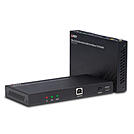
The Lindy 100m Cat.6 HDMI® 4K60, Audio, IR & RS-232 HDBaseT KVM Extender is a complete end to end high performance, reliable solution for extending HDMI® signals over long distances via Cat.6 network cable.
The following distance and resolution combinations are possible when using high quality Cat.6 U/UTP or F/UTP cable:
100m: 1920x1080@60Hz 4:4:4 8bit
70m: 3840x2160@60Hz 4:4:4 8bit / 4:2:2 12bit
Supporting resolutions up to 4K Ultra HD, video can be viewed in stunning clarity, while additional support for HDR (High Dynamic Range) allows content to be displayed with enhanced brightness, greater contrasts of blacks and whites and a much wider colour gamut. This provides a reliable solution for creating eye-catching digital signage in retail, immersive displays at events or engaging setups in larger conference rooms or lectures halls.
ARC support over HDMI® allows for audio content to be returned from the display to a connected amplifier or soundbar, while local audio extraction allows for the connection of audio outputs for immersive multi-channel audio. Digital audio embedding at the receiver side can also be used for source audio, which can easily be switching via the push button on the main unit.
PoC (Power over Cable) functionality provides additional flexibility. This allows power to be supplied alongside data through Cat.6 network cable in a point-to-point connection between the transmitter and receiver, meaning only a single power supply is required at the transmitter unit. Ideal when power outlets are limited at the receiver end of the installation.
USB 2.0 ports allow for mouse, keyboard, and other devices to be connected to the receiver to control a source device such as a PC or laptop. Featuring bi-directional IR ports at both sides of the setup, the source equipment can be easily controlled from the display side, and the display can also be controlled from the HDMI® source side. Combined with CEC control, which allows commands from one main remote, this extension system allows for complete and simple control for the user. Bi-directional RS-232 and Ethernet ports also allow for integration into larger control systems, or connection to network switches and hubs with LAN access.
In addition, the power supply is connected via a screw type DC jack, providing a more secure and reliable connection, perfect for professional installations where accidental disconnections could create a major issue.
HDBaseT is a globally recognised standard for high quality distribution of AV content and other technologies, including power and control, over longer distances via low cost Cat.6 or above cable.
HDBaseT and the HDBaseT Alliance logo are trademarks of the HDBaseT Alliance.able. Using a different cable type, introducing wall plates, couplers or patch panels will result in a reduction of possible distances.
The terms HDMI, HDMI High-Definition Multimedia Interface, HDMI Trade dress and the HDMI Logos are trademarks or registered trademarks of HDMI Licensing Administrator, Inc.
 |
KVM stands for keyboard, video, mouse. A KVM switch routes the signals from keyboard, monitor and mouse to the active computer, switching at the push of a button or via a hotkey combination. This lets you operate several computers with different operating systems using the same input devices, saves desk space and reduces cable clutter as well as the standby consumption of additional devices.
KVM extenders extend the connection between computer and workstation via network cable, fibre optic cable or IP. KVM over IP gives IT administrators remote access to PCs and servers as if they were on site.
Desktop KVM switches switch between 2 to 4 PCs at the workstation, including with multiple monitors. USB 2.0 or USB 3.0 ports and an integrated USB hub connect peripherals such as printers or scanners. High-quality models emulate keyboard and mouse so that there is no delay when switching.
Rackmount KVM switches manage 8, 16 or more servers in a 19" rack via a central console.
Matrix KVM switches give several users simultaneous access to different systems.
The key factors are the number of computers, the location of the users and the video interface, such as HDMI, DisplayPort or VGA.
More efficient workflows, fewer peripherals and fast switching between systems, for example between a work computer and a test system.
A docking station extends the ports of a laptop, while a KVM switch switches one console between several computers. The two can be combined.
KVM solutions from Lindy: Lindy offers desktop KVM switches, rackmount KVM switches, extenders and matching cables from a single source. System integrators and IT departments can get advice on projects and volume pricing from our technical sales team. Go directly to the product ranges here:
Desktop KVM switches Rackmount KVM switches KVM extendersDocking stations HDMI extenders
