


You are here: » Homepage
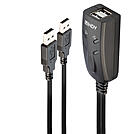
A KM switch allows an operator to conveniently control and manage multiple devices, such as PCs and servers, from a single keyboard and mouse console.
The Lindy 2 Port USB KM Switch is a compact solution for providing control over two PCs with independent displays from a single keyboard & mouse. With integrated cables, this switch can be easily connected directly to the system, with no need to purchase additional cables, saving time and money on the installation.
The KM Switch can be managed with hotkey switching under every OS without any restrictions while a unique software provides simple switching between computers by sweeping a mouse across screens under Windows and Mac OS.
The KM Switch can be used with standard wired keyboard & mouse, wireless devices may not be recognized.
Simple to set-up and compatible with a wide range of Lindy USB Extenders, this solution is ideal for small education and business environments or for helping make the most of IT equipment in the home.
Please note: the software supports only one display per computer. Software control is not currently compatible with devices supporting Linux.
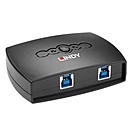
The Lindy 2 Port USB 3.0 Switch allows up to 2 users to share a USB 3.0 peripheral without the need to repeatedly swap cables or set up complicated network sharing software. The active computer port can be selected by push button. The switch is ideal for sharing a printer or scanner in a small office environment.
The 2 Port USB 3.0 Switch is backwards compatible with USB 2.0 and USB 1.1 devices and supports all USB equipped computers - perfect for use at home with multiple PCs or Macs.
Information about USB 3.0, 3.1 & 3.2
USB 3.0, USB 3.1 and USB 3.2 PCs, cables and devices are all compatible with each other, when using either a USB Type A or USB Type C host interface.
USB 3.0, USB 3.1 Gen 1 and USB 3.2 Gen 1 all support data transfer rates up to 5 Gbps.
USB 3.1 Gen 2 and USB 3.2 Gen 2 both support data transfer rates up to 10 Gbps.
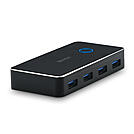
The Lindy USB 3.0 Sharing Switch 2:4 allows up to 2 users to share up to 4 USB 3.0 peripheral devices without the need to repeatedly swap cables or set up complicated network sharing software. The active computer port can be selected by push button. The switch is ideal for sharing a printer, storage device or webcam in office environments. It also allows to share a conference room presentation system like Barco Clickshare between two users. The USB 3.0 Sharing Switch features a 3.5mm Audio output port for connecting speakers or headphones.
The USB 3.0 Sharing Switch is backwards compatible with USB 2.0 and USB 1.1 devices and supports all USB Type A equipped computers - perfect for use with multiple PCs or Macs. The Sharing Switch features a USB Type C socket for an optional power supply (not included).
Information about USB 3.0, 3.1 & 3.2
USB 3.0, USB 3.1 and USB 3.2 PCs, cables and devices are all compatible with each other, when using either a USB Type A or USB Type C host interface.
USB 3.0, USB 3.1 Gen 1 and USB 3.2 Gen 1 all support data transfer rates up to 5 Gbps.
USB 3.1 Gen 2 and USB 3.2 Gen 2 both support data transfer rates up to 10 Gbps.
Information about USB 3.0, 3.1 & 3.2
USB 3.0, USB 3.1 and USB 3.2 PCs, cables and devices are all compatible with each other, when using either a USB Type A or USB Type C host interface.
USB 3.0, USB 3.1 Gen 1 and USB 3.2 Gen 1 all support data transfer rates up to 5 Gbps.
USB 3.1 Gen 2 and USB 3.2 Gen 2 both support data transfer rates up to 10 Gbps.
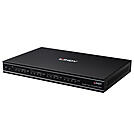
Information about USB 3.0, 3.1 & 3.2
USB 3.0, USB 3.1 and USB 3.2 PCs, cables and devices are all compatible with each other, when using either a USB Type A or USB Type C host interface.
USB 3.0, USB 3.1 Gen 1 and USB 3.2 Gen 1 all support data transfer rates up to 5 Gbps.
USB 3.1 Gen 2 and USB 3.2 Gen 2 both support data transfer rates up to 10 Gbps.
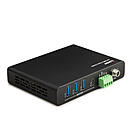
We recommend the 1m USB 3.2 Type A to B cable no. 36661 to connect the switch to your computers.
A USB switch, also known as a USB sharer, shares USB devices between several computers. Printers, scanners, external hard drives, webcams or headsets stay permanently connected and are assigned to the required computer at the push of a button. This saves duplicate peripherals, constant re-plugging and complex network sharing.
Benefits at a glance: shared use of expensive devices, a tidy workspace, fast switching between laptop and desktop PC, and driverless plug & play under Windows, macOS and Linux.
USB 2.0 switches are sufficient for printers, scanners and input devices. Auto switches automatically switch to the computer that is currently printing.
USB 3.0 switches with USB 3.2 Gen 1 transfer up to 5 Gbit/s and are suitable for storage media, card readers and webcams. Sharing switches connect two computers to four USB devices.
USB-C switches connect modern notebooks directly via USB-C. Bidirectional models share one device between two computers or connect one computer to either of two devices, including Power Delivery.
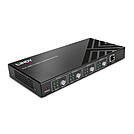
USB & audio KM switches share keyboard, mouse and audio between several PCs that each keep their own monitors – ideal for multi-monitor workstations.
USB matrix switches flexibly distribute up to four USB devices to up to four hosts. Control is via button, web GUI or RS-232, for example in conference rooms, laboratories or industry.
The key factors are the number of computers and devices, the USB standard and the switching method: button, hotkey, automatic switching or external control.
A USB hub expands the ports of one computer. A USB switch shares devices between several computers.
A USB switch only switches USB devices. A KVM switch also switches the video signal, so the monitor is shared as well.
No, a USB device is always assigned to exactly one computer. The switch changes this assignment at the push of a button.
USB switches from Lindy: Lindy offers USB switches from the compact 2-port model to the controllable 4x4 matrix switch. System integrators and IT departments receive advice on projects and volume pricing from our technical sales team.
