

European Customer Services:+34 930 46 50 92

We use cookies - Consent

We use third party services that help us to improve and optimize our online experience. For the use of certain services we need your prior consent which can be revoked at any time. You can find further information on data protection in our privacy policy

Details

Allow convenience functions

Allow shop optimisations

In order to optimise our website, we use services that collect and aggregate data and make it available to us as a statistical overview.

View imprint

Your filter options:

Type

Colour

You are here: » Homepage
A-Z:
Price:
Total 54 Products
Items per page
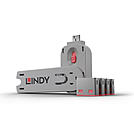
USB A Port Blocker, 4 pcs Pink + Key

  • Physically prevent access to a USB Type A Port
  • Quick and simple to use
  • Single key & 4 Type A Blockers
  • Pack of 10 blockers (without key) or individual keys are also available
  • 2 Year Warranty

USB Port Blockers are useful little devices that system administrators can use to physically prevent access to USB ports. USB Port Blockers allow locks to be inserted and removed from USB ports to stop unauthorised users from inserting pen drives, USB mass storage and mobile devices into shared workstations or devices with USB ports in public spaces.


To use, simply attach a lock to the key and insert it into the USB port. Release the sliding mechanism on the key to leave the lock in place. To remove, simply insert the key back into the lock and pull away. 


Please note: this key is only compatible with the corresponding colour of port blocker.
No.: 40450
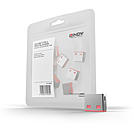
USB A Port Blockers, 10pcs, Pink

  • Physically prevent access to a USB Type A Port
  • Quick and simple to use
  • Pack of 10 Type A Blockers
  • Single key & 4 blockers or individual keys are also available
  • 2 Year Warranty

USB Port Blockers are useful little devices that system administrators can use to physically prevent access to USB ports. USB Port Blockers allow locks to be inserted and removed from USB ports to stop unauthorised users from inserting pen drives, USB mass storage and mobile devices into shared workstations or devices with USB ports in public spaces.

To use, simply attach a lock to the key and insert it into the USB port. Release the sliding mechanism on the key to leave the lock in place. To remove, simply insert the key back into the lock and pull away.

Please note: these port blockers are only compatible with the corresponding colour of port blocker key.
No.: 40460
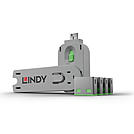
USB A Port Blocker, 4 pcs Green + Key

  • Physically prevent access to a USB Type A Port
  • Quick and simple to use
  • Single key & 4 Type A Blockers
  • Pack of 10 blockers (without key) or individual keys are also available
  • 2 Year Warranty

USB Port Blockers are useful little devices that system administrators can use to physically prevent access to USB ports. USB Port Blockers allow locks to be inserted and removed from USB ports to stop unauthorised users from inserting pen drives, USB mass storage and mobile devices into shared workstations or devices with USB ports in public spaces.


To use, simply attach a lock to the key and insert it into the USB port. Release the sliding mechanism on the key to leave the lock in place. To remove, simply insert the key back into the lock and pull away. 


Please note: this key is only compatible with the corresponding colour of port blocker.
    No.: 40451
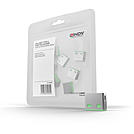
    USB A Port Blockers, 10pcs, Green

    • Physically prevent access to a USB Type A Port
    • Quick and simple to use
    • Pack of 10 Type A Blockers
    • Single key & 4 blockers or individual keys are also available
    • 2 Year Warranty

    USB Port Blockers are useful little devices that system administrators can use to physically prevent access to USB ports. USB Port Blockers allow locks to be inserted and removed from USB ports to stop unauthorised users from inserting pen drives, USB mass storage and mobile devices into shared workstations or devices with USB ports in public spaces.
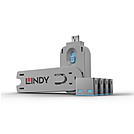

    To use, simply attach a lock to the key and insert it into the USB port. Release the sliding mechanism on the key to leave the lock in place. To remove, simply insert the key back into the lock and pull away.

    Please note: these port blockers are only compatible with the corresponding colour of port blocker key.
    No.: 40461
    USB A Port Blocker, 4pcs Blue + Key

    • Physically prevent access to a USB Type A Port
    • Quick and simple to use
    • Single key & 4 Type A Blockers
    • Pack of 10 blockers (without key) or individual keys are also available
    • 2 Year Warranty


    USB Port Blockers are useful little devices that system administrators can use to physically prevent access to USB ports. USB Port Blockers allow locks to be inserted and removed from USB ports to stop unauthorised users from inserting pen drives, USB mass storage and mobile devices into shared workstations or devices with USB ports in public spaces. 


    To use, simply attach a lock to the key and insert it into the USB port. Release the sliding mechanism on the key to leave the lock in place. To remove, simply insert the key back into the lock and pull away. 


    Please note: this key is only compatible with the corresponding colour of port blocker.
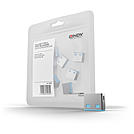
      No.: 40452
      USB A Port Blockers, 10pcs, Blue

      • Physically prevent access to a USB Type A Port
      • Quick and simple to use
      • Pack of 10 Type A Blockers
      • Single key & 4 blockers or individual keys are also available
      • 2 Year Warranty


      USB Port Blockers are useful little devices that system administrators can use to physically prevent access to USB ports. USB Port Blockers allow locks to be inserted and removed from USB ports to stop unauthorised users from inserting pen drives, USB mass storage and mobile devices into shared workstations or devices with USB ports in public spaces.


      To use, simply attach a lock to the key and insert it into the USB port. Release the sliding mechanism on the key to leave the lock in place. To remove, simply insert the key back into the lock and pull away.


      Please note: these port blockers are only compatible with the corresponding colour of port blocker key.
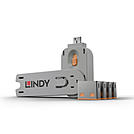

      No.: 40462
      USB A Port Blocker, 4pcs Orange + Key

      • Physically prevent access to a USB Type A Port
      • Quick and simple to use
      • Single key & 4 Type A Blockers
      • Pack of 10 blockers (without key) or individual keys are also available
      • 2 Year Warranty

      USB Port Blockers are useful little devices that system administrators can use to physically prevent access to USB ports. USB Port Blockers allow locks to be inserted and removed from USB ports to stop unauthorised users from inserting pen drives, USB mass storage and mobile devices into shared workstations or devices with USB ports in public spaces.


      To use, simply attach a lock to the key and insert it into the USB port. Release the sliding mechanism on the key to leave the lock in place. To remove, simply insert the key back into the lock and pull away. 


      Please note: this key is only compatible with the corresponding colour of port blocker.
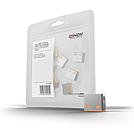
      No.: 40453
      USB A Port Blockers, 10pcs, Orange

      • Physically prevent access to a USB Type A Port
      • Quick and simple to use
      • Pack of 10 Type A Blockers
      • Single key & 4 blockers or individual keys are also available
      • 2 Year Warranty

      USB Port Blockers are useful little devices that system administrators can use to physically prevent access to USB ports. USB Port Blockers allow locks to be inserted and removed from USB ports to stop unauthorised users from inserting pen drives, USB mass storage and mobile devices into shared workstations or devices with USB ports in public spaces.
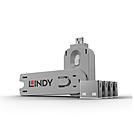

      To use, simply attach a lock to the key and insert it into the USB port. Release the sliding mechanism on the key to leave the lock in place. To remove, simply insert the key back into the lock and pull away.

      Please note: these port blockers are only compatible with the corresponding colour of port blocker key.
      No.: 40463
      USB A Port Blocker, 4 pcs White + Key

      • Physically prevent access to a USB Type A Port
      • Quick and simple to use
      • Single key & 4 Type A Blockers
      • Pack of 10 blockers (without key) or individual keys are also available
      • 2 Year Warranty

      USB Port Blockers are useful little devices that system administrators can use to physically prevent access to USB ports. USB Port Blockers allow locks to be inserted and removed from USB ports to stop unauthorised users from inserting pen drives, USB mass storage and mobile devices into shared workstations or devices with USB ports in public spaces.


      To use, simply attach a lock to the key and insert it into the USB port. Release the sliding mechanism on the key to leave the lock in place. To remove, simply insert the key back into the lock and pull away. 


      Please note: this key is only compatible with the corresponding colour of port blocker.
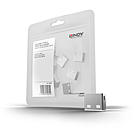
      No.: 40454
      USB A Port Blockers, 10pcs, White

      • Physically prevent access to a USB Type A Port
      • Quick and simple to use
      • Pack of 10 Type A Blockers
      • Single key & 4 blockers or individual keys are also available
      • 2 Year Warranty

      USB Port Blockers are useful little devices that system administrators can use to physically prevent access to USB ports. USB Port Blockers allow locks to be inserted and removed from USB ports to stop unauthorised users from inserting pen drives, USB mass storage and mobile devices into shared workstations or devices with USB ports in public spaces.
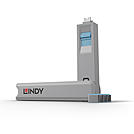
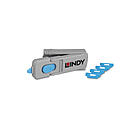
      To use, simply attach a lock to the key and insert it into the USB port. Release the sliding mechanism on the key to leave the lock in place. To remove, simply insert the key back into the lock and pull away.

      Please note: these port blockers are only compatible with the corresponding colour of port blocker key.
      No.: 40464
      USB C Port Blocker 4pcs + Key, Blue

      • Physically prevent access to a USB Type C / Thunderbolt Port
      • Quick and simple to use
      • Single key & 4 Type C Blockers
      • Pack of 10 blockers (without key) are also available
      • 2 Year Warranty
      USB Type C Port Blockers are useful little devices that system administrators can use to physically prevent access to USB ports. USB Port Blockers allow locks to be inserted and removed from USB ports to stop unauthorised users from inserting pen drives, USB mass storage and mobile devices into shared workstations or devices with USB ports in public spaces.

      To use, simply attach a lock to the key and insert it into the USB port. Release the sliding mechanism on the key to leave the lock in place. To remove, simply insert the key back into the lock and pull away.

      Please note: this key is only compatible with the corresponding colour of port blocker.
      No.: 40465
      HDMI Port Blocker Key - Pack of 4 Blockers, Blue

      • Physically prevent access to a HDMI Port
      • Quick and simple to use
      • Up to 4 blockers can easily be stored inside the key
      • Pack of 10 blockers (without key) are also available
      • 2 Year Warranty
      The Lindy HDMI Port Blockers are useful little devices that can be used to physically prevent access to HDMI ports. With the HDMI Port Blocker Key, the user can quickly block any open device ports and easily prevent users from connecting cables, devices or inserting foreign objects without permission.

      The semi-permanent HDMI Port Blocker is made up of a moulded plastic blocking cap that plugs securely into the HDMI port with a special insertion key. The blocker latches into the port just as a normal HDMI cable would and remains in place until removed using the insertion key.

      Designed to help protect against unauthorised access to IT or AV equipment, as well as preventing unintentional or malicious damage to ports. It can also act as a visual cue, showing inactive or disconnected ports, ideal for use in schools, office or other public sector environments.

      The key not only acts as the insertion and removal tool for the HDMI Port Blockers but also serves as a compact storage solution, ideal for IT administrators or facility managers managing multiple devices. This all-in-one design adds an extra layer of convenience to an already practical and efficient physical security tool. Up to four HDMI port blocks can be conveniently stored inside the specially designed key, making it easy for users to carry multiple blockers and use them as needed. 

      To use, simply attach a blocker to the key and insert it into the HDMI port. Release the sliding mechanism on the key to leave the blocker in place. To remove, simply insert the key back into the blocker and pull away.*

      Security Note: The Port Blockers will only act as a basic physical & visual deterrent to tampering. It will not prevent a determined attacker, intent on gaining physical access to a HDMI port.

      *Slide the button fully back while keeping your finger pressed on it, then pull the key straight out.
      When the button is slid fully back, the wings at the top of the key open to their widest and provide maximum leverage to remove the lock.
      No.: 40320
        1 2 3 4 5 Port-Blockers-Port-Locks

      Which Port Blocker solution suits your needs?

      Each starter set contains 4 blockers and 1 matching key. Refill sets without a key, as well as individual replacement keys, are available separately for every connector type. For types with several colour variants, the lock and key of the same colour are always keyed alike – different colours cannot be opened with the same key. This lets you, for example, colour-code different teams or departments.

      Solution Version Typical Use
      USB A 5 colours, each keyed alike Protects PC and notebook ports from unauthorised data transfer
      USB C 5 colours, each keyed alike Protects modern notebooks and docking stations
      RJ45 4 colours, each keyed alike Secures unused network sockets in offices and public areas
      SFP 1 colour Secures unused fibre optic ports on switches and patch panels
      HDMI 1 colour Protects display ports on conferencing equipment and digital signage
      DisplayPort 1 colour Protects monitor outputs at workstations and in meeting rooms
      Lindy Academy Logo
      FREE IT &
      AV TRAINING
